
Pages

Tuesday, September 9, 2008

How to add Google Gadgets to the Lotus Connections Home page

View Comments

2008-09-09_1528Fresh off the presses! This is HOT! You were probably anxious to know what the big surprise was all about, huh?

This is so HOT that I probably get asked about this 2-3 times a week. I promised in an earlier blog entry that developerWorks was about to publish an article that describes how to deploy Google Gadgets to the Lotus Connections Home page. If you didn't know about it, that's another reason to subscribe to the Lotus Connections page on developerWorks. Let's first review what the Lotus Connections Home page is:

Lotus Connections Home Page

The landing page of Lotus Connections can be easily extended by IT. An administrator has total control of which widgets can be deployed to the page. An end-user has total control of which widgets they want to see and the layout of these widgets.

In the meantime, you should know that one of the easiest ways to get started with widgets, is by using existing ones. I recently worked with a customer where we added Google Gadgets to the Lotus Connections Home Page. And we did this in a matter of minutes!!! Thinks about this for a second... and envision the vast variety of Google Gadgets out there. How cool is it that you can get one of these loaded into Lotus Connections in a matter of minutes??? Awesome, huh??!!

Up until now, the only documentation that we had on the Lotus Connections widgets was in the Lotus Connections RedWiki. In there, you can find instructions on how to code your own widget or how to use the Lotus Widget Factory to easily create widgets for the Lotus Connections Home page.

Adding Google Gadgets to the Lotus Connections Home page

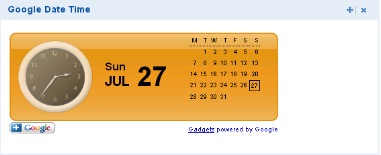
Today, we finally have the step-by-step procedure on how to do this! The article also explains, at a high-level, how to create your own iWidget (if you weren't using the Lotus Widget Factory). Here's a sample of how the Google Date and Time Gadget looks, as a widget, in the Lotus Connections Home page:
200808251101.jpg

What does this mean? You now have free out-of-the box integration with:

  • Facebook (for those of you who weren't too happy with my first approach)
  • RSS readers
  • MySpace
  • LinkedIn
  • Skype
  • Google Docs
  • or with whatever any of the 45,000+ Google Gadgets provide!

Additionally, remember that the Profiles page is also made up of widgets. Therefore, you could also deploy the Google Gadgets to the Profiles page. Neat, eh? Ready to get started? You'll find the article and the sample widget here. Enjoy!

Monday, September 8, 2008

Today I don't blog because tomorrow is huge!

View Comments
'Nuff said!

Thursday, September 4, 2008

Hacking Notes 8.5 Public Beta 2 for the Mac

View Comments

Remember all those great Lotus Connections features on Notes v8.5 that I blogged about two days ago? Well, just like I hacked Public Beta 1, I have now hacked Public Beta 2 so that us Mac users can enjoy those cool new additions!

You know the drill. This is completely unsupported and is provided AS-IS. And you can't hold me responsible for anything! However, whether it works or not, please post a comment to this blog entry with the following information:

  • OS (e.g. Ubuntu, Mac OSX Leopard, etc)
  • What specifically didn't work

I'm hoping that most of the comments will be successes and that will put pressure on the development teams to ship this hack (which is really just copy/pasting a bunch of JARs from Windows to Mac) as part of the product later this year.

To get it, go and download Lotus Notes v8.5 Public Beta 2 from here. Once you have it:

Ready to get started ? Here's how to install:

  1. Uninstall the previous hack if you had it installed. (File > Application > Application Management)
  2. Go to File -> Application -> Install
  3. Select Search for new features to install and click Next >
  4. Click on Add Remote Location...
  5. Set the Name to Activities Sidebar
  6. Set the URL to http://kensethdewalt.servicesolution.com/luis/site.xml
  7. Click Ok and then Finish
  8. Follow the remaining steps and restart Notes for the changes to go into effect

Note: You will see several categories listed. Make sure you select the category named: Notes 8.5 Public Beta 2.

If you do NOT see the Install option on your Notes menu, make sure you follow these instructions.

Enjoy! I've been using it for 1.5 days and have only noticed one issue: Searching Lotus Connections doesn't work due to a ClassNotFoundException: org.apache.xerces.parser.DOMParser. . Oh, and I tried moving the Quickr plugins from Windows to Mac, but they have some Win32 specific things in them.

Wednesday, September 3, 2008

Lotus Connections and Microsoft Sharepoint Integration Demo

View Comments

Ever since I first integrated Lotus Connections and Microsoft Sharepoint (wow, over a year now), I get requests on a weekly basis to see a demo of this functionality. I even created and posted an article in developerWorks with step-by-step instructions. Demo requests, however, didn't stop and most people said that they would prefer to have a video (instead of screenshots) to demonstrate the capabilities.

Well, you asked for it, and here it is. (View in full screen).

Note: Removed the embedded video because it was created with Jing and it doesn't resize properly. Please click the link above to view in full screen.

Please take a peek at this 5 minute video and give me your feedback as to what you liked / didn't liked. Even let me know if there's anything specific you would like to see. And though I have .NET development experiences, don't ask me to develop a custom web part. That's just out of scope for now!

Tuesday, September 2, 2008

Cool Lotus Connections integration capabilities on Notes 8.5 Public Beta 2

View Comments

The release of Notes 8.5 is around the corner and I like how the client it's taking shape. About 3 months ago, I blogged about the new capability of taking Lotus Connections Activities offline. And, if you are a Linux/Mac user you can also get this functionality by doing this hack that I blogged about.

searchbox.jpgTed Stanton, our new Americas Sales Advocate for Lotus Connections, blogged last week week about some nice features added to Notes 8.5 public beta 2 to further integrate the mail client with Lotus Connections. These are:

  • Get someone's person card when viewing an Activity's membership list
  • Tracking your Activities/To-Do's in your Notes Calendar (This is HUGE!! Almost all customers are asking for this)
  • Search Profiles from Notes
  • Search Activities from Notes
  • Search Blogs from Notes
  • Search Communities from Notes
  • Search Dogear from Notes
  • Dogear (tag/bookmark) Notes documents/views/databases
Looking for the eye candy ? Check out Ted's blog entry or download Notes 8.5 Public Beta 2 today! And because I know you'll ask, no, these don't work in the Mac beta yet. But just like I hacked beta 1, I intend to hack beta 2 so stay tuned to this blog!