I haven't seen anything in the news as to how this is going to affect Microsoft but they were one of the big proponents of this format. My theory was that BlueRay was going to win since that's what ships with most PlayStations and we all know how PlayStation totally overshadows the Xbox in market share.
How Social Business Accelerates Innovation in the Workplace from the perspective of a Millennial
Wednesday, February 20, 2008
HD DVD is dead -- take that Mircrosoft
I haven't seen anything in the news as to how this is going to affect Microsoft but they were one of the big proponents of this format. My theory was that BlueRay was going to win since that's what ships with most PlayStations and we all know how PlayStation totally overshadows the Xbox in market share.
Monday, February 11, 2008
My experience with Connections 2.0 at a customer site
Last week I spent two days in Chicago assisting a customer deploy the Alpha version of Lotus Connections 2.0. (If that's not bleeding edge, I don't know what is).
Anyway, I'm happy to report that the customer was ecstatic at seeing Lotus Connections 2.0 in their infrastructure. They had seen it at Lotusphere and couldn't wait to get it going ( and IBM delivered !!! ). Additionally, 100% of the Lotus Connections 1.0.2 TDI scripts that I created for them worked. I didn't have to change anything!
One new thing that I noticed in the installer is that you can now install 6 applications (including the Homepage) on one pass. You no longer have to run the installer 1 time per application, which was pretty annoying before. Moreover, you can now specify where you want user data to come from: LDAP or Profiles (more on this tomorrow). And yes, this means that Connections 2.0 will no longer officially need an LDAP!
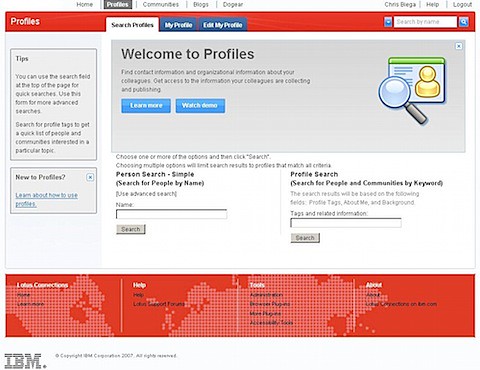
The Profiles database only has a couple of new tables. These keep track of your friends, tags assigned by others, etc. To convince the customer that we are the best, we brought in Angela Self. She did an amazing job branding Connections 2.0 with the customer's look-n-feel. Take a peek below:
Anyway, I'm happy to report that the customer was ecstatic at seeing Lotus Connections 2.0 in their infrastructure. They had seen it at Lotusphere and couldn't wait to get it going ( and IBM delivered !!! ). Additionally, 100% of the Lotus Connections 1.0.2 TDI scripts that I created for them worked. I didn't have to change anything!
One new thing that I noticed in the installer is that you can now install 6 applications (including the Homepage) on one pass. You no longer have to run the installer 1 time per application, which was pretty annoying before. Moreover, you can now specify where you want user data to come from: LDAP or Profiles (more on this tomorrow). And yes, this means that Connections 2.0 will no longer officially need an LDAP!
The Profiles database only has a couple of new tables. These keep track of your friends, tags assigned by others, etc. To convince the customer that we are the best, we brought in Angela Self. She did an amazing job branding Connections 2.0 with the customer's look-n-feel. Take a peek below:
Wednesday, February 6, 2008
That's cool!!! -- Recording in Sametime Unyte
Today, I used Sametime Unyte for the Lotus Social Software community call. I have to say that I'm very impressed about its recording capabilities. This community usually utilizes a Sametime Advanced chat room to share a presentation and provide a chat room. Whenever I wanted to record a presentation, I would use Camtasia, put my phone on speakerphone and record away using my laptop's integrated microphone. The audio quality wasn't great, but it got the job done.
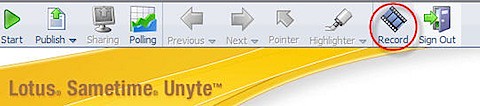
Now in Sametime Unyte, when you log in as the Moderator, you get a 'Record' button in the top toolbar.
I thought to myself: "Hmm.. maybe this is a good way to record the screen sharing/presentation session". To my surprise, the following dialog comes up:
WOW!! "Does this mean that this will record the audio too?", I thought. Sure enough, I put in the conference dial-in number and the passcode and I hear Sametime Unyte joining my bridge! NICE!!!
So Unyte can record both the presentation/screen and the audio from a conference call-in!!!! Love It!!!
Sorry if you all knew this, but I did not know of this feature.
Anyway, after the conference is done, a Flash file is produced automatically and can be posted in a repository for sharing.
Now in Sametime Unyte, when you log in as the Moderator, you get a 'Record' button in the top toolbar. I thought to myself: "Hmm.. maybe this is a good way to record the screen sharing/presentation session". To my surprise, the following dialog comes up:
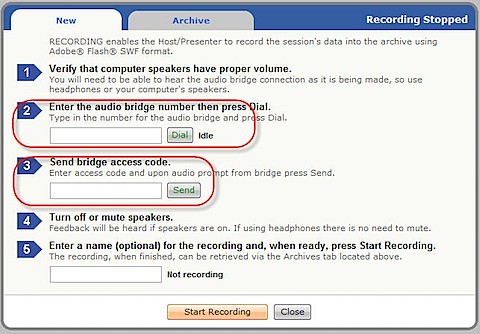
WOW!! "Does this mean that this will record the audio too?", I thought. Sure enough, I put in the conference dial-in number and the passcode and I hear Sametime Unyte joining my bridge! NICE!!!
Sorry if you all knew this, but I did not know of this feature.
Anyway, after the conference is done, a Flash file is produced automatically and can be posted in a repository for sharing.
Tuesday, February 5, 2008
Step-By-Step: Using Connections API from Sametime v7.5.1
Daniel Kehn, Sr. Software Engineer for WPLC, has published the following article: Integrating IBM Lotus Sametime with the Lotus Connections REST services. This step-by-step article is yet another example of the flexibility of Lotus Connections and its consumability. If you are in touch with business partners and/or customers who wish to write their own solutions, make sure you point them to this article.The article is currently the Top Story at Lotus DeveloperWorks so I'm sure it's going to get a lot of exposure! Here's an abstract of the article:
This article teaches you how to extend IBM Lotus Sametime Connect so
that users can more easily reach out to the coworkers of a chat partner
for help. The solution leverages the department hierarchy available in
the Profiles component of IBM Lotus Connections. The same solution
could easily be extended to help connect your employees to others using
relationships unique to your business (for example, those who share
particular interests, recognized experts, support organization members,
and more).
Isn't that cool?? Spread the word and Dogear it!!
Wednesday, January 30, 2008
LDAP attributes required for Lotus Connections
A customer asked me today what are the required attributes that must be present in the LDAP in order to log in.. I couldn't find an answer, but in my experience they are:
Note: These are the minimum attributes that you need in order to successfully login. Extra information such as managerId, secretaryId, departmentId, orgId, etc would need to be loaded into Profiles, but it doesn't have to come from an LDAP. Hopefully that makes sense.
- Logon Id (usually something like uid, sAMAccountName, or mail)
- Email address
- Password
- Display Name (usually either cn or displayName)
- Unique Identifier (these can be changed as per this page):
- MS Active Directory: objectGUID
- Domino: dominoUNID
- Novell eDirectory: guid
- Tivoli Directory Server: ibm-entryUUID
- Sun Directory: nsuniqueid
Note: These are the minimum attributes that you need in order to successfully login. Extra information such as managerId, secretaryId, departmentId, orgId, etc would need to be loaded into Profiles, but it doesn't have to come from an LDAP. Hopefully that makes sense.
Subscribe to:
Posts (Atom)