Twitter drives innovation...
If you are actively using social networks, you've probably heard of ping.fm. Ping.fm allows users to update their status in the following services from any of the following clients:
| From: |
|
To: |
- Skype
- SMS
- E-mail
- AOL Instant Messenger
- Yahoo Messenger
- MSN Messenger
- GTalk
- etc
|
 |
- Twitter
- Facebook
- LinkedIn
- Identi.ca
- Flickr
- FriendFeed
- etc...
|
 So from a single place you can update all of your statuses. And you can do this from different places. You are NOT forced to go to ping.fm's website to update your status. Ping.fm can receive status updates from various sources and then send them to your sites.
Pretty cool, huh? Well, I saw a tweet suggesting that updating your Lotus Connections status from ping.fm would be valuable too. Wouldn't it be cool if we could update Lotus Connections status from SMS, Skype, AOL, and other !?! I agreed and took the challenge upon myself. 
The code gets done...
The code was actually pretty simple to code up and test (~3 hrs). So how did I do this? Here's the flow:
- Configured Ping.fm to add a custom URL (i.e. http://my.ip.address:8080/PingFMLotusConn/ping.fm)
- From any ping.fm client, I send a status update
- Ping.fm sends an HTTP POST request to the above URL (I had to open a port in my firewall for this to work)
- My custom web application, in turn, uses the Lotus Connections Atom API to update my status
I tested this and it works like a charm!! That's right.. you can now microblog in Lotus Connections from ping.fm!
Open questions / challenges...
Before releasing the code, I still have one challenge that I have to address. Since ping.fm will send the status update request in behalf of the user, ping.fm needs access to the URL defined above. Therefore, a customer would have to put it in the DMZ or poke a hole in their FW for this to work. The challenge, however, is how do I know the user who's posting the message since ping.fm doesn't send any user information. The ping.fm API is not very detailed and basically they only give me a message, but nothing else.
Let's secure it!
I thought of asking people to hardcode their credentials in the URL, for example: http://my.ip.address:8080/PingFMLotusConn/ping.fm?username=...&password=... (instead of:http://my.ip.address:8080/PingFMLotusConn/ping.fm). However, this is not very secure because you are giving your credentials to ping.fm AND ping.fm would transmit those over the wire in clear text.
My thought right now is to create a Trust Association Interceptor (i.e. lazy man's SSO). This would require that the user include their email address only, not their password, as part of the URL. This has a security hole because anybody could then assume someone else's identity. For example, I can give ping.fm this URL and update Mac Guidera's status: http://my.ip.address:8080/PingFMLotusConn/ping.fm?username=mac_guidera@us.ibm.com. Not very secure. 
So I'm thinking that I need to create a widget on the Profiles page that gets deployed by Lotus Connections Admins. This widget would generate a user specific URL (e.g. http://my.ip.address:8080/PingFMLotusConn/ping.fm?authToken=...) where authToken is an encrypted token that uniquely identifies the user (that way users can't assume the identity of others).
If you've read this far... thoughts ?
 Gemini Systems, an IBM business partner, together with ISSL (IBM Software Services for Lotus) have been working with the Teach For America organization. Specifically, ISSL and Gemini have been helping Teach for America deploy an extranet portal with the Connections and Quickr capabilities very nicely integrated with each other.
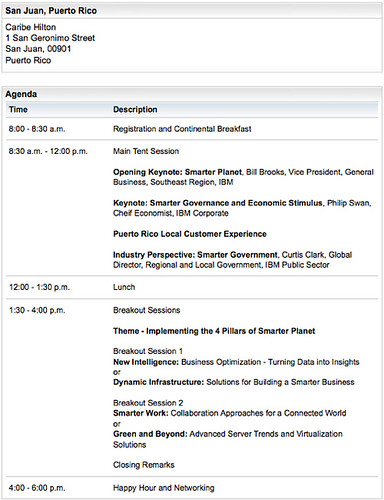
 In two weeks, I'm going to be presenting at the Caribe Hilton in Puerto Rico at IBM's Free City Tour of Building a Smarter Planet. The event takes place on June 9th and is open to the public. Here are the details for the event: