Pages

Monday, February 16, 2009

Developing Java Applications for Lotus Notes on the Mac

View Comments

This week I've been working on creating my first Java application for Lotus Notes v8.5 on the Mac. Now you may be asking how this can be my first Java application for Notes on the Mac since I already hacked Lotus Notes to include the Activities sidebar. While that is a Java application, it's not one that I created and second it's really an Eclipse plugin that runs inside of Notes. What I'm trying to do is create a Java application that runs outside of Notes, yet queries Notes for information.

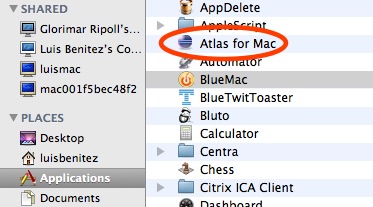
So what am I doing? Well, as a side project, I decided to port the code for Atlas to the Mac. The Atlas client is just a Java SWT application, so how hard could it be?

Deploying SWT applications in the Mac

The first step was to figure out how to actually get an SWT application running on the Mac. The folks at Eclipse have already documented this process and it's pretty straightforward. The key is to put in the SWT libraries for the applicable platform. Therefore, I removed the swt.jar and related DLLs from the Java application and put in the Mac OS X SWT.jar and libraries.

200902132207.jpg

Troubleshooting SWT applications in the Mac

Double-clicking the application, didn't do anything. Time to troubleshoot! I downloaded and installed Eclipse 3.4. Running the application from within the Eclipse environment shed some light on the problem: for some reason the Notes libraries could not be loaded by the Java Virtual Machine (JVM). I posted a question about my problem in the Lotus Notes 8.5 forum and hope someone can provide an answer. Additionally, I've opened a PMR to get official help from IBM.

How It Looks

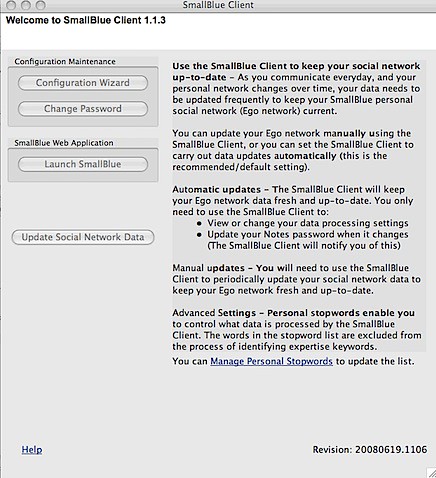
To prove that it was just a Notes issue, I commented out all the code calling the Notes APIs. I recompiled, ran it and saw the following.

200902132221.jpg

So I'm almost there... as soon as I can figure out why I can't call the Notes APIs from my standalone Java application, I should be golden! Isn't Java great ?

Friday, February 13, 2009

I've Been Named One of BlueIQ Most Valuable Ambassadors!

View Comments

Woo Hoo!! Earlier this week I was notified that I was named one of BlueIQ's Most Valuable Ambassadors for Q4 2008. In case you don't know what BlueIQ is, it's the executive-sponsored program within IBM led by Gina Poole. The mission for the BlueIQ team is to show the business value of social tools both inside and outside of IBM and how these tools can help you be more productive. To achieve its mission, the BlueIQ team established the BlueIQ Ambassadors community where volunteers from all over the world, from different IBM divisions get together and further evangelize the value of social software. The community currently has over 400 members, and the core BlueIQ team is about 6-7 people.

Does that mean that there are only 400 social software ambassadors within IBM ? Nope! While the core team is about 7 people, and there are over 400 "official" social software ambassadors, there are many more. In fact, I didn't become an official ambassador (i.e. I hadn't clicked the button to Join the Community) until the 3rd quarter of 2008. And as you know, I've been evangelizing social software for much more longer than that.

Every quarter, the BlueIQ team names its most valuable ambassadors. In Q3, the winners were sent to Germany for the Web2.0 conference over there. Gina Poole, in fact, presented at that conference (see below). The winners for this quarter were going to be sent to the Enterprise 2.0 conference in Boston later this year. Unfortunately, due to the economy, that's not going to happen. Hopefully, I can find another way to get to the conference this year .

It's a honor to have been selected among so many great ambassadors within IBM!

Monday, February 9, 2009

Lesson Learned And Addendum to InfoCenter

View Comments

As I said on my previous post, Friday was a VERY long day. Early in the morning I was told that there was a CritSit at a customer. The situation had been escalated all the way up to Jeff Schick (VP of Social Software). Since it's never good to have a VP associate a CritSit to your name, I had to get this resolved (and quickly) to make sure the blame would not come my way .

And it starts...

The week before, I had upgraded this customer up to Lotus Connections v2.0.1. At first, the environment was working ok, but then on Wednesday they ran into some issues:

  • users couldn't log in
  • forums in private communities were not working
  • widgets in the profiles page weren't working properly

In summary, it was a mess!

Troubleshooting

The first step was to resolve the login issue. To do this, we enabled several traces (see below) in the WAS admin console to see what was going on with WALTZ (the component that fetches users for Lotus Connections). After carefully reviewing the trace log, we noticed that the mapping for GUID (the system's globally unique id) was being re-mapped from 'dominoUNID' to 'DistinguishedName'.

com.ibm.directory.profile.*=all:com.ibm.connections.directory.services.*=all:
com.ibm.websphere.wim.*=all:com.ibm.ws.wim.*=all

For some time we couldn't figure this out. By default, the default mapping for GUID (a.k.a ExtId) is dominoUNID when the LDAP server is Domino (which was the case for the customer). Then one of the developers on the call, spotted this warning in the internal Wiki:

200902081935.jpg Warning

If Domino R8 & beyond is in need and the binding credential, which is used in setting up LDAP repositories on WAS, do not have administrators' privilege to query for Domino LDAP schema, then this manual procedure is a MUST-HAVE to configure 'dominoUNID' as the VMM (external) ID!

Success! The user that we are using to bind to the Domino LDAP is not an administrator and our Domino server is R8. This warning is not in the InfoCenter, so we never did this manual procedure. Now the question was: why did it work before and broke after the upgrade?

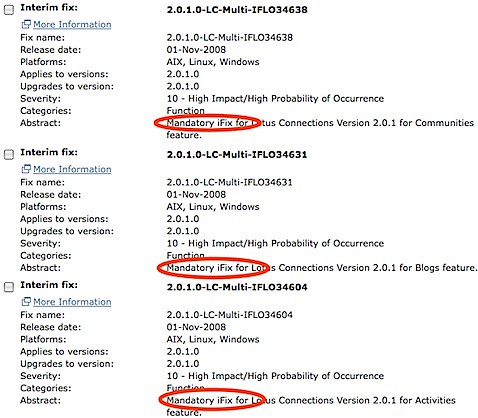
200902081653.jpgWell, turns out that apparently there are some broken iFixes. When I did the upgrade, I went ahead and installed all 32 of the available iFixes. I was questioned by one of the developers as to why I did this since iFixes should not be installed unless mandated by support. Turns out that I didn't know that and when I started looking at the iFix list chronologically, most of them said 'Mandatory' so I proceeded to install.
We were told by development to remove iFixes 36025 and 36482. I can't remember what those were for, but today I noticed that the iFix page has 26 fixes instead of 32. Therefore, I'm assuming some other iFixes were not working properly. Anywho, we uninstalled those two iFixes and users were able to log in again!

The final problem was fixing the forums in private communities. This was quite easy to find: the SSO domain for the LTPA token was misconfigured.

Lesson Learned

So, lesson learned:only install iFixes when mandated by support, unless they are clearly marked as 'Mandatory'. And if you are deploying Lotus Connections with a Domino R8+ LDAP and the bind user is not an administrator, you must manually map ExtId to dominoUNID.

How To Enable the Lotus Connections Person Card in Notes 8.5

View Comments

Friday, was a VERY long day. I'm going to quickly summarize what I've been up to and why I've been seemingly disconnected from Twitter. The good thing is that there are lessons learned that I would like to capture here for various reasons:

  1. So that I don't make the same mistake again
  2. So that others can benefit from my mistakes

Let's start with the fun stuff first. A customer wanted to know how to enable the Lotus Connections person card in Notes 8.5. Not sure why, but for some reason this capability is disabled out of the box. To enable, follow these steps:

  1. Go to C:\Notes\framework\shared\eclipse\plugins\com.ibm.openactivities.client.common.service_3.5.0.20081211-1925
  2. Make a backup of plugin.properties
  3. Open plugin.properties with your favorite text editor
  4. Scroll to the bottom of the file and find this line:

    bizcard.show=false
    

  5. Replace it with

    bizcard.show=true
    

  6. Save the file
  7. Close and restart Notes

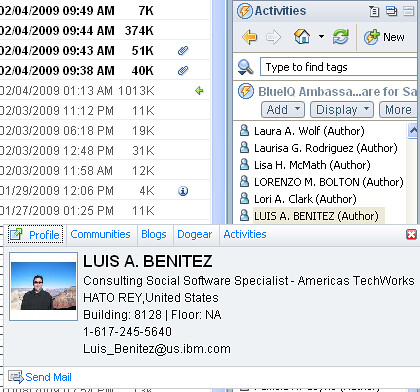
Now when you are in the Activities sidebar and look for people, simply hover over them, right click and the person card will show up as shown below!


Mac users: If you are using my hack, this should have already been done for you.

Enjoy!

Wednesday, February 4, 2009

Batch Import Data Into Lotus Connections

View Comments

One request that I've heard a couple of times from customers is how to migrate content into Lotus Connections. My common answer is to use the included IBM Tivoli Directory Integrator (a.k.a. TDI) to migrate data into the Lotus Connections databases. While this approach works, it's probably not the best in a production environment. Why? Well, it's never good to circumvent the application and modify its database. Instead, it would be nice if we could use the Lotus Connections APIs to batch import data into the system.

Up until today, this was a bit difficult because TDI did not include an Atom connector and it just so happens that the Lotus Connections APIs are Atom-based. A connector is nothing more than a plug-in into TDI which simplifies data exchanges. In TDI, there's already an HTTP connector, but the Atom layer is missing and time consuming to code. Well, not anymore!

Today, a great article was published on developerWorks which explains how to use an AtomConnector to read and write data to Lotus Connections. And, it even includes an AtomConnector you can use in your own assembly lines. The article focuses on how to read and write data from the Lotus Connections Blogs component, but it can be extended to any of the other components.


For more information, you can find the article here: Integrating Tivoli Directory Integrator and Lotus Connections. Oh and if you are interested in learning more about TDI, check out my two quick demos on How To Load Users from a Spreadsheet and How To Load Photos from LDAP.