Pages

Tuesday, September 30, 2008

Collaboration Matters Podcast - Episode 4 - My Journey From eLearning to Social Software

View Comments

I recently had the pleasure to join Neil Burston and Stuart McIntyre as part of their Collaboration Matters Podcast series! While I had already created several podcasts internally at IBM, I had never done one externally. Needless to say, I was very excited that they reached out to me in order to create my first external podcast.

If you are already following the Collaboration Matters blog, then you already know the news and probably even heard the podcast already! If you are not subscribed to the podcast, I would like to encourage you to do so. In Episode 3, Heidi Votaw and Suzanne Minassian talk about the latest and greatest in Lotus Connections 2.0.

So what is this journey from eLearning to Social Software ? Well, as I've mentioned before, I used to be an eLearning developer and consultant before taking on my current role. Thus, Neil asks me how I got into this whole social software space and how I became so passionate about the subject. We also talk about some challenges that I've run into in the past 2 years. In fact, let me give you a quick overview of what the podcast is about:

  • 01:30 - Good morning to you - Buenas tardes desde aquí!
  • 02:00 - Collaboration Matters is running the Connectr event (see slides below) and Lotus Connections Blog
  • 02:20 - Luis, tell us about yourself, what you do, your role and how you got into this
  • 03:20 - My job as an eLearning consultant and my first transition to social software... a "expected" evolution/transition
  • 03:50 - How I learn by contributing content in the social software space
  • 04:30 - The beauty of living in Puerto Rico
  • 05:30 - My own, personal introduction to Lotus Connections
  • 06:40 - Evaluate social software as an eLearning approach / solution for a customer in Tampa. I had been blogging since early 2006 and was familiar with Social Bookmarking but was not an avid user. I had to make a case for how these technologies could help solve their elearning needs.
  • 07:55 - Results of the social software for eLearning pilot. Challenges that we encountered re: privacy in this multi-national environment
  • 09:30 - Legal blocks to social software deployments in Europe
  • 11:30 - My view, as a millenial, on the benefits of sharing knowledge with social software
  • 14:00 - Why it was so hard to share before social software
  • 16:20 - Which industries are using social software ?
  • 18:10 - What really blew me away... social software at construction companies!!!
  • 21:00 - How the product itself promotes adoption
  • 22:45 - Have you seen any downsides to not having any formal processes behind knowledge sharing?
  • 25:30 - How Lotus Connections, as an enterprise social software platform, promotes self-policing
  • 27:35 - Tell us about the usage of social task management and Lotus Connections Activities
  • 31:15 - The role of repeatable human processes and social software
  • 32:40 - What's your favorite feature of Lotus Connections ? Definitely, Dogear, the social bookmarking component of Lotus Connections
  • 35:00 - How feed readers help in my day-to-day job
  • 36:40 - Complete the following sentence: "I love Lotus Connections because..." - it works with me! It's always with me, I depend on it, I trust it
  • 38:00 - Closing comments...

2008-09-30_1149One success story (of many) behind all this, is that I met Neil and Stuart strictly through social software. More specifically via my blog and Twitter. By using social software we collaborated effectively even though there was an 8 hour difference between us!! (It was 7:30am my time when this was recorded).

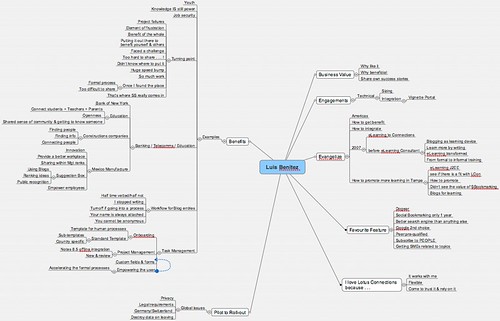
Neil, also told me that he was able to capture our conversation as a MindMap. I didn't know what a MindMap was until today. But no worries, I downloaded MindManager for Mac and was able to look at it. Pretty cool!!! The tool looks really interesting and I'm going to start playing with it more to see how I can use and apply it to my daily life. If you have any suggestions, please let me know.

Here are the slides used at the Connectr #6 event:

Slides from the Connectr#6 event:

Connectr #6
View SlideShare presentation or Upload your own. (tags: connectr lotus)

Ready to start listening? Subscribe to the podcast or download the MP3 from here. I hope you like it!

Monday, September 29, 2008

OpenSearch Integration for Lotus Connections

View Comments

200809262042.jpgA while ago, I noticed that one of our competitors uses OpenSearch to provide quick, easy integration with the browser. You see, any page that implements this specification will automatically show up in browsers such as Mozilla Firefox v2+ and Internet Explorer 7 (see the screenshot). Searching social data from the browser is very powerful because it encourages adoption. If a search doesn't return the expected results, all a user has to do, is change the search engine in the browser and re-submit. Easy. Simple.

Not to be outdone, I decided to read the specification and see how complicated it would be to add this to Lotus Connections.

Turns out, it's a 15 minute task! Basically, you create one XML file for each search capability you want to provide. As an example, I created 6:

Each file looks roughly like this. If you want to use them on your deployment, simply change the host name as shown in the screenshot below. If you want to add more, simply do the search you want to provide and then copy the URL format to the template section.

200809262034.jpg

To add this to Lotus Connections, follow this simple process:

  1. Copy the files above to <DOC_ROOT>/search ( e.g. /opt/IBM/HTTPServer/htdocs/en_US/search or C:\IBM\HTTPServer\htdocs\en_US\search)
  2. Go to <WAS_PROFILE_ROOT/installedApps/<CELL_NAME>/Activities.ear/oawebui.war/WEB-INF/jsps/html_prototype/fragments/mainpage
  3. Save a backup of setupajax.jsp
  4. Open setupajax.jsp with your favorite text editor
  5. Add the following lines inside the <HEAD> section of the file

    <link rel="search" type="application/opensearchdescription+xml" title="Search Profiles by Name" href="/search/searchProfilesName.xml">
    <link rel="search" type="application/opensearchdescription+xml" title="Search Profiles by Tag" href="/search/searchProfilesTag.xml">
    <link rel="search" type="application/opensearchdescription+xml" title="Search Activities" href="/search/searchActivities.xml">
    <link rel="search" type="application/opensearchdescription+xml" title="Search Blogs" href="/search/searchBlogs.xml">
    <link rel="search" type="application/opensearchdescription+xml" title="Search Communities" href="/search/searchCommunities.xml">
    <link rel="search" type="application/opensearchdescription+xml" title="Search Dogear" href="/search/searchDogear.xml">

  6. Save and close the file
  7. Repeat steps 3-6 for the following files:
    • Blogs.ear/blogs.war/themes/blog/_header.vm (and for each theme)
    • Communities.ear/tango.web.ui.war/WEB-INF/jsps/html/tiles/frameworkHeader.jsp
    • Dogear.ear/dogear.webui.war/h3/jsp/main/h3.jsp
    • Profiles.ear/peoplepages.war/WEB-INF/jsps/html/tiles/frameworkHeader.jsp
    • Homepage.ear/dboard.war/web/jsp/main.jsp

And there you have it! You may want to change the code above just a bit so that, for example:

  • when you are in Profiles only the Profiles search shows up
  • when you are in Blogs, only the Blogs search shows up
  • etc...

That's left as an exercise to the reader.... For now, follow these simple steps and you can start searching across Lotus Connections from your browser!!

Friday, September 26, 2008

"Are you Luis, from Socialize Me?"

View Comments

This was the question a prospective customer asked me when I introduced myself. But before I tell you more about that, let me give you a bit of background.

The adventure begins

Tuesday (yes, 3 days ago), I woke up at 4:45am for the first flight of the day from SJU to SFO. I flew via JFK because AA now has in-flight internet service for flights between JFK and SFO, LAX, and MIA. Unfortunately, however, I didn't quite read the fine print: in-flight internet is only available on those flights that happen on Boeings 767-300 and my JFK to SFO flight was on a Boeing 767-200 . What I thought was going to be a productive 5.5 hr flight from JFK-SFO turned out to be a relaxing flight watching The Office and Two and Half Men.

Arrival to San Francisco

I arrived at SFO at 5:50pm (8:50pm my time). I called the IBM crew and they were still in the office working on the finishing touches. I drove into the office and met them there, but not without some complications. You see, the IBM office is at 425 Market St, and while the GPS did a good job of getting me there, finding street parking was a mess. With the Oracle Open World conference going on, traffic in downtown was pretty heavy. To add to that, I got into "one-way-and-no-left/right-turn" hell. After 30 mins I was able to find street parking. It was now 7:15pm (10:15pm my time).

We reviewed the presentation and went over the demo items again to make sure we were all set. At 9 (12am my time), we went to a nice, enjoyable dinner at Osha. We got back to the office at ~10:15p (1:15am my time) copied the VMWare image into my local laptop (it's always better to demo from a Mac ). Now because of the aforementioned Oracle conference, I couldn't get any hotels downtown. The closest hotel was 20 miles away. After initially getting lost, I was able to get on I-80 and checked in to my hotel at 11:59pm (2:59am my time). That's right, I have been up for 22 hours straight. I'm thinking to myself: "How will I perform tomorrow at the customer demo?" One thing is certain: Starbucks is going to make a lot of money out of me tomorrow!

Customer meeting

On Wednesday, I woke up at 5:45a after a 4.5 hr sleep. I went downstairs and had a power breakfast (coffee with eggs)! As I drove into San Francisco, I had to take the Golden Gate Bridge. As I approached it from the north, there was a spectacular view of it! Fog had completely covered it. It was awesome and very beautiful. As I entered the fog, I could only see 2 cars ahead of me.. So spooky!

Over at the office, we did yet another practice run to make sure we were still ok. Once we arrived at the customer site, I introduced myself and 2 different people asked me: "are you Luis, from Socialize Me" ? I was in shock. "Yes!! How did you find my blog", I asked. "Just randomly as we did our research on different social software platforms", they replied. AWESOME, the customer has already gone through my blog! This is fantastic! Lotus Connections pretty much sells by itself after reading my blog, I hope...

The meeting with the customer went from 1p-5pm. In my opinion, the meeting went very well and the customer had a lot of questions. I could tell that the customer had already listened to our top competitor. Once the meeting was "done", the customer asked us to stay for a bit to discuss some follow on items. I, unfortunately, had to leave to the airport to catch a 6:40p flight to LAX.

Will the adventure end?

I decided to fly SFO-LAX-JFK-SJU instead of SFO-JFK-SJU because the former was going to get me home 4 hrs before the latter. The SFO-LAX flight was a snap. The LAX-JFK flight boarded on time, but then we sat for 1.5 hrs at the gate because of a cockpit light that wouldn't go off. The flight arrived in JFK 10 minutes after my connecting flight had departed. That meant that I got stuck in JFK for 5 extra hours until the next flight. My expected 4 extra hours with the family quickly vanished! When it was time to board the JFK-SJU flight, the flight attendants were MIA (no, not in Miami, just Missing In Action). That meant an additional 30 minute delay.

When the plane finally starts to taxi to the runway, the pilot welcomes the travellers. He says that today's trip will be 300 miles longer because "we have to fly around some weather". At usual plane speeds (500 mph) that means an extra 36 minutes!! I am now getting home 6 hours later than my originally scheduled flight.

I just hope my bad luck with planes this week doesn't mean that the customer is not choosing IBM over our competitors...

Thursday, September 25, 2008

Using Lotus Connections from a Ruby Web App

View Comments

200809251003.jpg Continuing to demonstrate how easy it is to consume Lotus Connections content from other applications, the Top Story today at developerWorks is an article that explains how to build a Ruby on Rails (RoR) web application that consumes Lotus Connections content via the REST API.
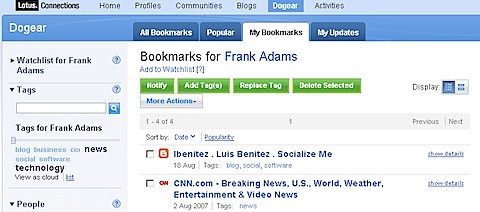
The article, written by one of IBM's Portlet Factory architects (Thomas Beauvais), is very clear and concise. It walks you step-by-step on how to create a Ruby web application and configure it to use to use data retrieved via the REST APIs instead of a database. Thomas explains the code needed to call the Dogear REST APIs to get a person's bookmarks and tag cloud. To my surprise, there's very little code needed to get this going!

One of the things that I like about it is that it's a great tutorial for Ruby beginners (like myself) on how to create a Ruby web application. After reading the article, I feel like I can build any type of Ruby application. Hopefully, I'll get a chance to work on this with one of my customers!

Ready to read more? Check out the article here. And don't forget about the article that I co-authored which explains how to use Portlet Factory to create a portlet that consume Dogear via the REST APIs.

P.S. Is it just me or does the title open itself to a bad interpretation ?

How to add button to view private Dogears

View Comments

As you may know by now, Dogear is my favorite component of all the Lotus Connections services. It has even become my primary search engine over Google. For those of you who don't know, Dogear is the social bookmarking component of Lotus Connections. It lets users tag any URI, be it a HTTP URL in the intranet or in the internet (i.e. http://....), an FTP address (ftp://....), a Notes Database/View/Document (i.e. notes://...) or any other URI addressable resource.

200809230845.jpg To tag (or bookmark) a page it takes the same amount of clicks (sometimes less) than to bookmark a page locally in your own browser! As such, I've found no need to bookmark anything locally (especially since I tend to use multiple computers and it's just easier to share bookmarks between computers if they persist in a server). Dogear, of course, also provides the capability for you to bookmark pages 'privately'. In other words, only you have access to them.
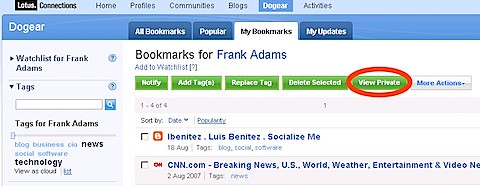
And while Dogear provides a My Bookmarks view as shown, it shows all your public and private bookmarks. Recently, a colleague asked in an internal forum how to add a button to show only someone's private bookmarks. I thought I would share the answer with the general population.

To view your private bookmarks, simply add access=private as one of the parameters in the URL and voilá! So if the 'My Bookmarks' URL is: http://connections.demoibm.com/dogear/html/mybookmarks?lang=en change that to: http://connections.demoibm.com/dogear/html/mybookmarks?lang=en&access=private.

Well, ask and you shall receive! To add a button follow these instructions:

  1. Go to <WAS_ROOT>/profiles/AppSrv01/installedApps/<cellName>/Dogear.ear/dogear.webui.war/h3/jsp/main
  2. Save a copy of bookmarks.jspf
  3. Open bookmarks.jspf with your favorite text editor
  4. Find the following section in the file
  5. Add the line in bold
  6. Save the file
<c:if test="${myBookmarks && p.totalItems > 0}">
<script src="${pageContext.request.contextPath}/script/my-bookmarks.js" type="text/javascript"> </script>
<span class="lotusBtn lotusBtnAction lotusLeft"><a href="#" onclick="displayLinkNames('notifyMultiForm', 'notifyLinksSpan');return false;"><fmt:message key="jsp.bookmarks.notify.multi"/></a></span>
<span class="lotusBtn lotusBtnAction lotusLeft"><a href="#" onclick="displayLinkNames('addtagMultiForm', 'addTagLinksSpan');return false;"><fmt:message key="jsp.bookmarks.addtag.newtag" /></a></span>
<span class="lotusBtn lotusBtnAction lotusLeft"><a href="#" onclick="displayLinkNames('retagMultiForm', 'reTagLinksSpan');return false;"><fmt:message key="jsp.bookmarks.retag.multi" /></a></span>
<span class="lotusBtn lotusBtnAction lotusLeft"> <a href="#" onclick="deleteMany();return false;"><fmt:message key="jsp.bookmarks.delete.selected" /></a> </span>
<!-- Added by Luis -->
<span class="lotusBtn lotusBtnAction lotusLeft"><a href="#" onclick="javascript:window.location.href=window.location.href+'&access=private';return false;">View Private</a></span>
<!-- End by Luis -->

<span class="lotusBtn lotusLeft"><a href="#" onclick="menuUtility.openMenu(event, 'multiEditActionsMenu');return false;"><fmt:message key="jsp.bookmark.link.moreactions" /><img src="<c:url value="/nav/common/styles/images/btnDropDown.gif" />" alt="" /></a></span>
</c:if>

And the result should be:

200809230912.jpg

Isn't it beautiful and awesome when you can do cool stuff like this by simply modifying 1 line of code ??