Pages

Thursday, January 14, 2010

Terms & Conditions for Lotus Connections Login page

View Comments

Recently, I was working with a customer who wanted to ensure that their users agree to some terms and conditions before being able to log on to Lotus Connections. It turns out that this customization is not too bad. I had heard from Mitch Cohen that jQuery was a nice library to do this.

I did some searching online to see if someone had done something similar. I found this awesome article: Modal Confirmation Dialog on Form Submit: Javascript, jQuery, and Thickbox. It basically shows you how to do the same thing in 3 different ways. I chose to use jQuery for this little project.
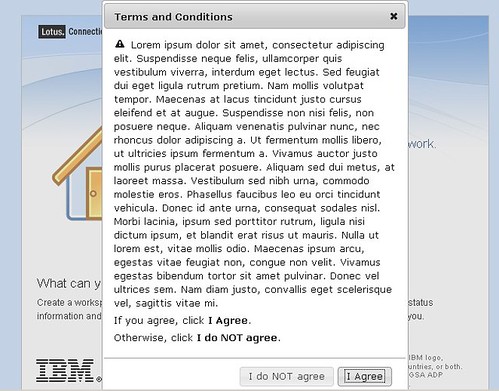

Here's step-by-step how I did it:

  1. Download the jQuery libraries. This link did it for me: http://jqueryui.com/download/jquery-ui-1.7.2.custom.zip
  2. Extract the files to a directory in your HTTP server. I put them in a directory called jq in: C:\IBM\HTTPServer\htdocs\en_US
  3. Go to <WAS_PROFILE_ROOT>\installedApps\<cellName>\Homepage.ear\dboard.war\auth
  4. Save a copy of login.jsp
  5. Open login.jsp with your favorite text editor
  6. Add the following before the closing </HEAD> element

     <!-- Include jQuery -->
    <link rel="stylesheet" type="text/css" href="/jq/jquery-ui-1.7.2.custom.css">
    <script type="text/javascript" src="/jq/jquery-1.3.2.min.js"></script>
    <script type="text/javascript" src="/jq/jquery-ui-1.7.2.custom.min.js"></script>
    <script type="text/javascript">
    $(function(){
            // jQuery UI Dialog    
    
            $('#dialog').dialog({
                autoOpen: false,
                width: 400,
                modal: true,
                resizable: false,
                buttons: {
                    "I Agree": function() {
                        document.lotusLoginForm.submit();
                    },
                    "I do NOT agree": function() {
                        $(this).dialog("close");
                    }
                }
            });
    
            $('form#lotusLoginForm').submit(function(){
                $('#dialog').dialog('open');
                return false;
            });
    });
    
    </script>
    

  7. Now go on to the end of the file.
  8. Just before the </BODY> element, insert the following code:

    <div id="dialog" title="Terms and Conditions">
      <p>
      <span class="ui-icon ui-icon-alert" style="float:left; margin:0 7px 0 0;"></span>
    
    <p>Lorem ipsum,blah blah blah</p>
    <p>If you agree, click <b>I Agree</b> below.</p>
    <p>Otherwise, click <b>I do NOT agree</b>.<p>
    </div>


Download Lotusphere presentations from Dropbox

View Comments

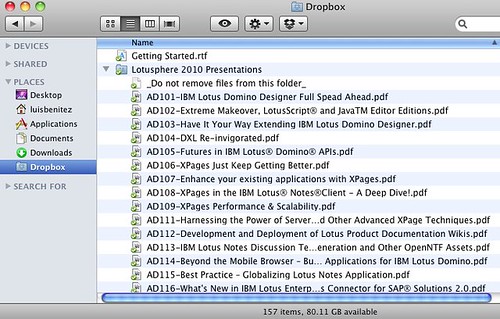
Via Alan Lepofsky's blog I discovered that Volker Weber has setup a shared DropBox folder for downloading Lotusphere presentations. The idea is to make it easier to download presentations for Lotusphere by crowdsourcing the process of putting all presentations into a single place. If you want to sign up to help, click here for details...

Enjoy!

Wednesday, January 13, 2010

Three books you should buy

View Comments

As we get ready for Lotusphere 2010, I thought I would make you aware of a couple of books that have been published recently and I recommend you buy.

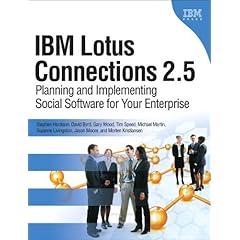
First, there's IBM Lotus Connections 2.5: Planning and Implementing Social Software For Your Enterprise. This book was written by a set of Lotus Connections experts ranging from product managers, developers, and services specialists. It covers everything from business value of social software, to adoption of social software in the enterprise, to deploying and customizing Lotus Connections v2.5. I was the technical editor for this book, so you know the content is good.


Second, there's Web 2.0 and Social Networking for the Enterprise by Joey Bernal. This book also has a foreword by Jeff Schick and you may remember that I gave away a copy recently at the Tri-State LUG. Joey and I worked together under the same manager when I used to work in the IBM Software Services team. He asked me to be a technical reviewer for chapters 1 and 4. Chapter 1 is around definitions on Web 2.0 and Social Networking, while chapter 4 is about Social Software for the Enterprise.


Last, there's The Social Factor which has a page dedicated to me! The author of the book, María Azua, interviewed me to learn more about my story of Why I Love Blogs. She liked my story so much that she included it in page 50 of the book. My former teammate, Laurisa Rodriguez, wrote a chapter for this book. ComputerWorld lists this book as one of the 5 must-read books for social media marketing.


Enjoy!

Connections Glue: A New Twitter Client for Lotus Connections

View Comments

Since late November, a new microblogging client for both Lotus Connections and Twitter has been available. You may remember that I some time ago I had blogged about another microblogging client for these services called Bluto. As far as I know, Bluto was the first available microblogging client that incorporated both Twitter and Lotus Connections.

With all the craziness of my job during the 4th quarter of the year, I didn't really get a chance to play with Glue until the new year (read last week). After using it for a week now, I have to say that Glue is very cool! One thing that I was never happy with Bluto was the way it handled replies. In Connections Glue, you can actually see the conversation threads within Lotus Connections. Another thing that I like a lot is how the threads are sorted. In Connections Glue, threads are sorted by the date of the most recent comment. Therefore, active threads are always kept near the top and allows you to engage in conversations and not miss it (which would typically happen in systems like Facebook or Twitter).

You also have the ability to:

  • Search for People by tags, name, etc
  • Search for Files
  • Preview images directly in Connections Glue
  • Email contacts

Here's a quick demo of Connections Glue. If you are an IBMer, you can download it for free (and I extremely recommend it). Others have a 30 day trial.

Enjoy!

Tuesday, January 12, 2010

Lotusphere Tweet Up - Details for your calendar

View Comments

For the 3rd year in a row, the Lotus Social Software Community will be getting together at Lotusphere. I'm going to be co-hosting the event along with Brian O'Curran, Sonia Malik, and Bilal Jaffery. If you'll be at Lotusphere, be sure to join us at this year's event:

What: Lotusphere Tweet Up

Where: Meet @ the playground between Grotto Pool and position N in the map.

When: During the Opening Reception, Sunday night January 17th @ 6:30pm

Why: Because our photos may be out of date.

For more information, see: http://planetlotus.org/61b548. See you there!