Pages

Monday, January 11, 2010

Change the default login page in Lotus Connections Homepage

View Comments

Today is a short blog post to share a cool customization that I've been asked about a lot recently.

One of the most common questions that I get these days is how to configure Lotus Connections so that the default page after login is the 'My Page' tab of the Homepage instead of the 'Updates' tab. The 'My Page' tab is the one that contains the widgets and that was the default in the v2.0.x days. In v2.5, the development team added activity streams and that's what's shown immediately after login.

Luckily, this has already been documented by my friend and co-worker Gerard Muecke. To see how this is done, check out Gerard's blog post: Changing the landing page after login in Lotus Connections 2.5.   

Enjoy!

Friday, January 8, 2010

Connections Upgrade and Migration Webcast on Jan 13th, 2010

View Comments

Next week, I'm going to be one of the panelists at the Connections Upgrade and Migration Webcast on Jan 13th , 2010. The event is free and is open to everybody.

Here's some information on the event:

Abstract
IBM Development and Support are hosting a Tech Exchange webcast and call on the topic of "Upgrade and Migration From Lotus Connections V2.0 to V2.5". There is no charge for participating.

Details:

Title: Upgrade and Migration From Lotus Connections V2.0 to V2.5

Date: Wednesday, January 13th, 2010
Time: 9:00 am - 10:30 am eastern US time (2:00 pm GMT)
Webcast access: https://www.lotuslive.com/en/join?schedid=4419191
Audio by phone:
Toll free US: 866-803-2143
Toll call US: 210-795-1098      
Confirmation Code: CONNECTIONS
Please dial in 5-10 minutes early to allow time for registration of all participants before the presentation starts.

Open Mic calls are Question & Answer sessions with a panel of subject matter experts covering your questions without going thru a slide presentation.

The slides will be posted as a reply to this topic when they are ready.

You can submit your question in advance via this forum. Questions should be of general interest. Troubleshooting of specific problems should still be handled by Technical Support, not by Webcast calls. We will collect questions, which have been posted to the forum as a reply to this topic and address as many of them as possible on the call. We will also take questions not submitted in advance.

You will need to provide your name and company affiliation when dialing in. You will need a touch tone phone to be able to ask questions. The presentation will be recorded and (in potentially edited form) made available via a web page to be linked from the Tech Exchange page.

You can find an up-to-date schedule of upcoming Open Mic calls and Webcast calls, as well as links to slides and recordings from past calls, here:
http://www.ibm.com/support/docview.wss?rs=899&uid=swg27011126

For more information, see this post. See you there!

Thursday, January 7, 2010

Updated: 10 principles for Enterprise 2.0 implementations

View Comments

About 19 months ago, I worked with the founder of BinaryPlex and creator of HiveMind, Tim Bull, to put together the 10 architectural principles for an Enterprise 2.0 implementation. Based on our experience since then, we have updated these principles. You'll notice that now we've removed 'architectural' from the title and now formally using the Enterprise 2.0 keyword. You can read the entire story in Tim's blog entry.

So here they are:

Principle 1: User controlled privacy, common security
Social software is by it’s very nature social! While user privacy is important and should be available at their discretion, authentication schemes should remain based on common standards to promote sharing and connectivity. In general, open read access is preferred. Complex, multi-factor Enterprise SSO solutions are generally NOT very compatible with social media goals even when they do integrate (e.g. they often break RSS, prevent mashups etc).

Principle 2: Identity reuse
Options should be provided to allow users to share profiles and identity without re-keying lots of information, externally this could mean Open Auth schemes. In Enterprises, identity should be able to be integrated into directories and other authoritative user sources.

Principle 3: Ubiquitous Online Access
Social Software should be considered an online access solution (ie. limited facility required to access the information in an off-line capability), but access should be facilitated from multiple points including mobile devices, not just a particular browser.

Principle 4: Don't create silos
The value of a trusted network dynamically increases with its sizehttp://en.wikipedia.org/wiki/Metcalfe's_Law. Ensure that your implementation is targetting the greatest number of users.

Principle 5: Modular services with integration based on common Open Standards
Services should be designed to maximise simple re-use and allow users to mashup up modules to meet their specific requirements. Support for protocols like ATOM, RSS and REST architectures is key to enable this.

Principle 6: Configuration not Customisaton
Social Software is evolving quickly, extensively configuring the software, not customising it by modifying core elements allows rapid roll-up to future versions and capabilities as these improve.

Principle 7: Build for Rapid Growth
Social Software is difficult to control and pilot, so system design should allow for a rapid uptake and changing usage patterns. Build with added headroom above what you might normally size for a pilot system. If you're inviting 1000 users, allow for 2000.

Principle 8: By the People, For the People
Be very clear on the aim and purpose of the system and make sure you remove barriers to adoption that prevent and hinder people sharing information with each other. This includes promoting Internationalisation and Ease-Of-Use UI's (no-one ever received training on LinkedIn). The counter to this is that you have an Enterprise Centric Approach where the information and its use is driven and mandated by the "good" of the Enterprise which is quite different in principle. In social media implementations, Enterprises are the benefactors of the outcomes of human interactions; it's the people who are the consumers driving the benefit.

Principle 9: Limit Content Creation Work-Flow
Social software solutions promote the sharing of information and activities, deriving value from the flow of this information through the eco-system. Approval processes hinder the value of this conversation, reducing the incentive to participate in the system. Strong requirements for content-creation work-flow potentially suggest that either social software is the wrong solution for the business, or that the business is not yet culturally aligned with social software.

Principle 10: People not Documents
Social Software is about people connecting to people and discovering and carrying on a conversation. It's not a document centric publishing and storage platform (although it may potentially extend to that if documents aid the conversation).

Wednesday, December 16, 2009

Going to Lotusphere? Tune in to the Lotusphere podcast

View Comments

If you are going to Lotusphere on January 17-21, 2010 you MUST subscribe and listen to the Lotusphere podcast. Currently, there have been 6 episodes posted. In each episode, Stuart McIntyre interviews guests and gets them to share their tips and stories on attending Lotusphere.


In episode 5, I join Stuart to share my own view of Lotusphere. Want to know my favorite parts of Lotusphere? My tips on what to do? And what's worth waking up at 6am on Thursday for? Then go on and listen to the podcast now.

Tuesday, December 15, 2009

Microblogging plugin for Lotus Notes and Lotus Connections

View Comments

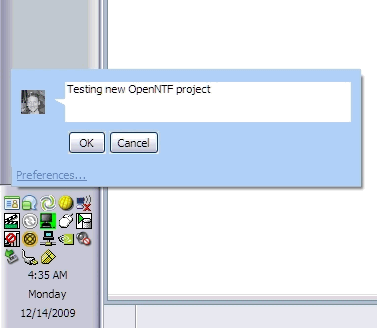
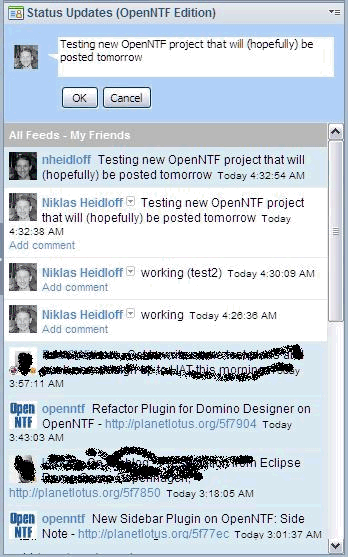
It's finally here! Super awesome IBMer Jessica Wu Ramirez created a Lotus Notes plugin that basically allows you to update your status and follow conversations that are happening in Lotus Connections directly from your Lotus Notes client. Jessica created this within 24 hours of Lotus Connections 2.5 being out and has been continuously updating the client making it better in every iteration.


The client also lets you update your status in Twitter. And even if Lotus Notes is minimized (or you are not using it at the moment), you can update your status directly through a system tray icon.

So go ahead and download and install this free plugin.

Enjoy!