Pages

Friday, November 7, 2008

How to upgrade to Lotus Connections 2.0.1

View Comments

Well, I'm finally done. I'm sad to say that it took ~12 hours to upgrade from Lotus Connections 2.0.0.1 to 2.0.1. It seems that there are some problems with the Update Installer. Apparently, shipping a product on Halloween (like trying an underwater escape) is not a good idea. Or maybe one of our competitors hacked into our servers and broke it for us??

Anyway, here's the steps that I had to take to upgrade my Lotus Connections 2.0.0.1 server to 2.0.1:

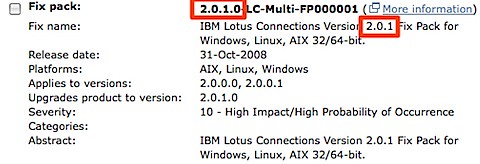
  1. Download the Lotus Connections 2.0.1 Fix Pack from Fix Central (select Lotus, Lotus Connections, 2.0.0.0, <your platform>) 200811061420.jpg
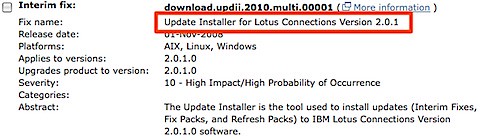
  2. Download the 2.0.1 Update Installer from Fix Central (select Lotus, Lotus Connections, 2.0.1.0, <your platform>)200811061422.jpg
  3. Download the Lotus Connections 2.0.1 Database Wizards from Passport Advantage
  4. Stop the Lotus Connections server
  5. Upgrade the DB silently (you can use the wizard, but then you will have to upgrade the Blogs DB manually)
  6. Upgrade the product from 2.0.0.1 to 2.0.1 silently (the wizard didn't work for me). I used the following command:
    updateLC.bat -installDir c:\ibm\WebSphere\LotusConnections -fixpack -install -fixpackDir c:\ibm\WebSphere\LotusConnections\update\fixpacks -fixpackID LC201_Fixpack -wasUserid lcadmin -wasPassword passw0rd
    
  7. Perform step 10 as listed here. (It's listed as an Optional step, but it's really a Required step)
  8. Start the Lotus Connections server
  9. Run the following wsadmin command
    1. Start the wsadmin interface
    2. Type the following command: execfile("blogsAdmin.py")
    3. Type the following command: BlogsMigrationService.populateLoginNames()
    4. Type exit to quit the wsadmin interface
  10. Stop the Lotus Connections server
  11. Download the latest fixes from the page where you downloaded the 2.0.1 Fixpack (see step 1 above)
  12. Install the iFixes silently. I used this command:
    updateLC.bat -fix -installDir "C:\ibm\websphere\lotusconnections" -fixdir "c:\ibm\websphere\lotusconnections\update\fixes" -install -fixes LO34540 LO34604 LO34631 LO34638 LO34665 LO34676 -wasUserId lcadmin -wasPassword passw0rd
    
  13. Re-do your changes to the <WAS_PROFILE_ROOT>/config/cells/<cellname>/LotusConnections-Config/*.xml files
  14. Delete your Dogear index
  15. Start your Lotus Connections server!

And there you have it. I'm giving this to the documentation folks so they can fix the InfoCenter.

Note: Updated on Nov 11, 2008 to fix the order of the steps.

Thursday, November 6, 2008

I own the world!

View Comments

Well, a piece of it, anyway. Let me explain. Yesterday was a big day for me, in my opinion. I closed a loan to buy my first piece of the world. My first piece of "real" property.

While I already own my condo, I don't consider that to be "real" since I don't actually own the land where the condo sits. But now, finally, I own a piece of this world. This is sure the first step in my plans for global domination!

Nah, while I don't plan to rule the world, I do feel a sense of responsibility. Now that I'm expanding my family, I want to make sure that I set an example for them. I definitely want to focus on designing and building a house that's environment friendly and try to do my part so that my kids have a clean, safe world to play in.

Here's the area where I bought. You can see several lots here. In order to protect preserve keep some privacy, I won't tell you which one, or how much I paid for it .

View Larger Map

I've heard horror stories about contractors and the such. I'm sure it's going to be a fun and stressful situation. Let the adventure begin!!

Wednesday, November 5, 2008

Lotus Connections for Higher Learning

View Comments

Remember that story that I told you a while ago on how a university displaced their eLearning software and is now using Lotus Connections? Well, here's a video that was recently posted on YouTube and explains the rationale behind that decision and why Lotus Connections and social software fits better.


Enjoy!

Tuesday, November 4, 2008

Lotus Connections v2.0.1 is here!

View Comments

Each quarter, there's a new version of Lotus Connections out there. This quarter we shipped Lotus Connections 2.0.1 (on Halloween). I didn't post anything on Friday, 'cause I thought sharing some baby pictures in his costume was a tad more important. Also, the new version was very well covered by Stuart and Mitch.200811040533.jpg

If you are upgrading, you can download it from IBM's Fix Central. One question that I'm continuously asked is: "what's new in Lotus Connections v2.0.1?". Well, here's a list of what I've gathered:

  • Quickr integration with Activities - Push-button publication from an Activity into one of your Quickr Places for permanent document storage
  • Quickr integration with Communities - Allows communities to use Quickr as their content repository and document collaboration platform.
  • Enhanced person card
  • E-mail is no longer a required attribute (great for external implementations)
  • New feeds inside of Communities
  • New feeds for forums
  • New APIs for Activities, Blogs, Communities, Homepage (federated search), Profiles
  • Hidden support for STLinks (more about this tomorrow)
  • User Interface and Usability enhancements, for example:
    • Can now save members as part of an activity template
    • Drag-n-drop activities entries
    • Uploading images to a blog is now easier
    • Improvements in the Activities widget
    • Easier way to work with multiple bookmarks
  • A couple of bug fixes

Monday, November 3, 2008

What's Going on in My Network? A Recommendation From a Customer

View Comments

A potential customer sent me this on Friday so that I could share with the UX team. Since I know the Lotus Connections UI Designers follow this blog, I thought I would share this here instead of emailing them.

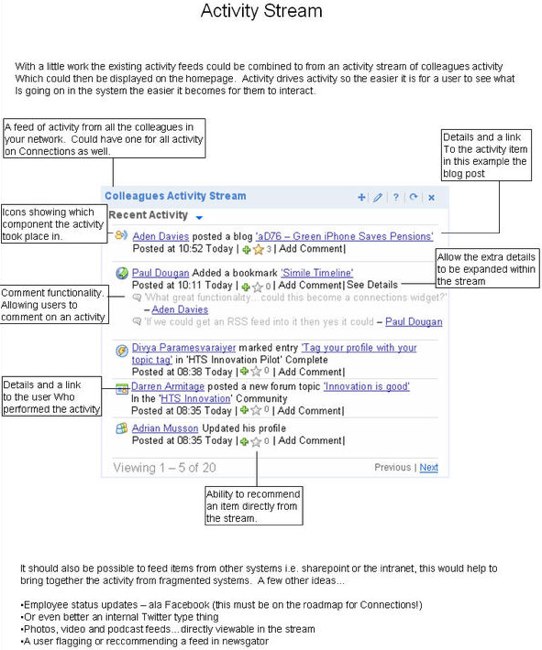
Aden Davies, who I met through Twitter and the Lotus Connections Twitter Feed, works as an "Innovation Technician at a large bank". We were talking about some of the new features in 2.0.1 and he shared his vision of a great addition to our widgets. He actually sat down and spent the time developing this mockup.

I actually liked this a lot. I even suggested something like this be added because it's very similar to the home page feed you would see in Facebook.

The idea is to provide a better feed as to what's going on around you.

I think this is also a great example of how Twitter can be used to improve collaboration with your customers and drive innovation into products faster!