Pages

Tuesday, March 9, 2010

The Red Cross Launches their Social Network with Lotus Connections

View Comments

Today, the Spanish Red Cross announced their go live of World Red Cross (Mundo Cruz Roja in spanish), their social networking site powered by Lotus Connections.


The Red Cross is all about communities helping communities. As such, they felt that a social networking solution would be appropriate for them. After comparing with various vendors, they picked IBM's solution and went live today. The idea is that each community will serve different purposes, but they all have one thing in common: the need to share information amongst its members.

I like how they even created a community so their members can support each other as they learn to use this new social networking site. I think this is a great idea because that way you can reduce your IT and Help Desk support costs. The site has been enabled in 26 languages so pretty much anybody in the world can use it.

Go check it out: http://www.mundocruzroja.org

Friday, February 19, 2010

Easily Search Lotus Connections from Google Chrome

View Comments

Lately, I've been using Google Chrome as my default browser to see if I can get used to it. I always considered myself very productive using Firefox, and I've heard so many good things about Chrome that I decided to give it a try. The features that I relied the most on Firefox were the Firebug plugin and searching Lotus Connections directly from the browser. Searching Lotus Connections directly from Firefox was possible thanks to OpenSearch which Lotus Connections supports since v2.5.

Google Chrome comes with a Firebug-like capability already built-in so that was easy. My next priority was setting up Chrome to search Lotus Connections instead of Google ( we all know at this point that Connections is a better search engine than Google, right?). Everywhere I looked, it said that Chrome supports OpenSearch. I couldn't, however, figure out how to add Lotus Connections to Chrome via OpenSearch.

Luckily, there's a way to do it manually (this is how I did it in my Mac. It may be a bit different in Windows):

  1. Open Chrome
  2. Go to Preferences...
  3. Under Basics, you'll see Default Search set to Google. Click on Manage
  4. Click on the + sign to add a new search engine
  5. Set the Name to Lotus Connections, the Keyword to lc and the URL to https://<hostname>/search/web/search?query=%s (for example: https://w3.ibm.com/connections/search/web/search?query=%s). It should look like this:


  6. Click Ok
  7. Optional: Select it and click on Make Default
  8. Close the Preferences panel.

If you didn't set Lotus Connections as your default search engine, here's what you do. Say you want to search for "enterprise2.0 software". In Chrome's omnibox, type "lc enterprise2.0 software" (w/out the quotes) and press Enter. And voilá, you've now searched Lotus Connections directly from the browser without needing to open Connections first and logging in.

Enjoy!

Wednesday, January 27, 2010

Lotus Connections Status Updates comes to Microsoft Sharepoint

View Comments

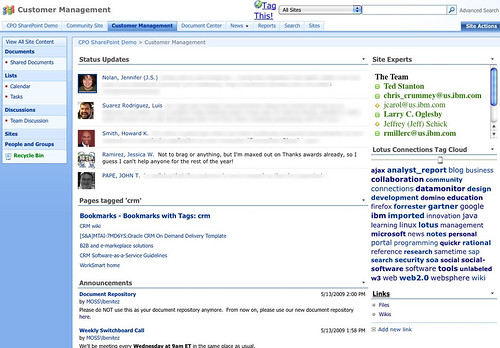
I'm currently preparing for a demo of Lotus Connections for a customer who uses Microsoft Sharepoint heavily. One of their requests is that they want to be able to access Lotus Connections data directly from Sharepoint so that users don't have to jump back and forth between the two applications. By now, you've probably seen my demo of the out of the box integration capabilities between Lotus Connections and Microsoft Sharepoint.

To add to that, I thought it would be interesting to see if I could bring Lotus Connections' microblogging capability to Sharepoint. Since Sharepoint has a web part that renders feeds, the first attempt was to use that web part and point it to the feed of status messages from Lotus Connections. While that was nice, it didn't look pretty at all!

Luckily, the web part allows you to customize the XSL so that the output looks nicer. (XSL defines the way to transform XML into HTML). So I took the original XSL and replaced it with a new one.

For the techies out there, you can download both and compare them. You'll see that I basically changed about 10-15 lines in the original file. For those that already own a Sharepoint site, go ahead and add the RSS web part (which has a bad name cause the web part can handle RSS, Atom, iTunes feeds, and other..), put in this new XSL, point it to the feed of status updates from Lotus Connections, and voilá.


There you have it! Now you can see the team's Lotus Connections status updates in Microsoft Sharepoint in less than 5 minutes.

Enjoy!

Bookmark simultaneously to Lotus Connections and del.icio.us

View Comments

Earlier today I received a ping from one of my favorite customers. He showed QuixApp a nice bookmarklet that basically lets you do whatever you want. He thought this would be a good idea, for example, to create a bookmarklet that would simultaneously bookmark a page both in Lotus Connections and in del.icio.us.

I immediately answered that this has been available for a while, internally at IBM. The following bookmarklet was created by Sacha Chua and if you are browsing an internal page (e.g. w3.ibm.com/....) then the page is only bookmarked in Lotus Connections. If you are browsing an extranet site (e.g. www.cnn.com... ) then the page will be tagged in both services (you don't want internal/confidential pages to be accidentally saved to del.icio.us, right?).

Before you can use it with your own Lotus Connections deployment, you'll have to customize it a bit. Once you look at the code, you'll see something like this:

if(!location.href.match('.ibm.com'))

The first step is to change that from .ibm.com to whatever your company's hostname is. Next, you'll want to change the Lotus Connections URL. In the code you'll see something like this:

var%20h='http://w3.ibm.com/connections/dogear';

Again, change that to match the deployment of your organization and voilá.

IBMers: Drag and drop it to your bookmarks bar: tag this

According to Sacha, the bookmarklet builder was very handy during the creation of this bookmarklet.

Monday, January 25, 2010

Demo: New BlackBerry Client for Lotus Connections

View Comments

Last month, there was a press release announcing the new version (2.0) of the BlackBerry Client for Lotus Connections. While the press release was a bit confusing, it announced that the new client would be available on May 8th. What wasn't clear is that it was only going to be available to select customers.

Earlier today, I stumbled upon this great demo by Fred Clarke which gives a tour of the new client capabilities.

One of the most distinctive changes in this new client is that we now have native applications for all of the Lotus Connections modules. In the 1.x version of the client, only Profiles and Dogear had native applications, the rest required you to launch the browser, which was, at times, slow.

From the looks of the demo, the interaction is extermely fast. I believe this new client will be very powerful for our customers and their mobile workforce. This is definitely going to enhance Enterprise2.0 for the mobile world, something that I haven't seen any other Enterprise2.0 vendors doing. And this is a nice complement to the new mobile interface for iPhone users.

Enjoy! (and thanks to RIM for doing this for us!)