XSL who ? Well, let me give you some background. Some time ago, I blogged about a SharePoint iWidget that I created that would list all the SharePoint sites that I'm a member of. There is a lot of interest from both external and internal users. You see some time ago, I was contacted to see if I could help develop an iWidget that would parse an Atom feed and convert that to HTML.
Turns out that that's pretty much what the SharePoint iWidget did... it took an XML file and using XSL, it converted the XML into HTML for rendering within an iWidget in the Lotus Connections Homepage. Therefore, all I had to do was to 'harden' the iWidget and make it more generic so that it works with any XML file and any XSL file. I call it the XSLTWidget, where XSLT stands for XSL Transformation.
The cool thing about this iWidget is that it works with any XML source:
- output from a web services call
- an Atom document
- an Atom feed
- an RSS feed
- an HTML page
- the output of a batch job
- etc..
Therefore, with this simple iWidget the possibilities are now endless! Using this new iWidg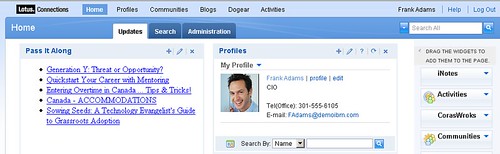 et, I was able to create a very simple widget for Pass It Along. I specified the XML URL as the URL to one of the Atom endpoints, and specified the XSL URL as the URL to an XSL file that Sacha Chua created for me. Easy. Simple. In minutes!
The widget even supports specifying a username/password (for those cases where the XML data source requires authentication).
You can download the iWidget from here (including documentation).
Enjoy!
Very kewl. Now I know 3 people who understand XSLT (That would be Michael Kay who invented it, you -- and I forgot the other guy's name).
ReplyDeleteJoke aside, that iWidget will be extremly helpful!
:-) stw
The downloaded zip file is corrupt!!!
ReplyDeletePlease upload a proper zip.
Check to see if it works now.
ReplyDelete