Friday, was a VERY long day. I'm going to quickly summarize what I've been up to and why I've been seemingly disconnected from Twitter. The good thing is that there are lessons learned that I would like to capture here for various reasons:
- So that I don't make the same mistake again
- So that others can benefit from my mistakes
Let's start with the fun stuff first. A customer wanted to know how to enable the Lotus Connections person card in Notes 8.5. Not sure why, but for some reason this capability is disabled out of the box. To enable, follow these steps:
- Go to C:\Notes\framework\shared\eclipse\plugins\com.ibm.openactivities.client.common.service_3.5.0.20081211-1925
- Make a backup of plugin.properties
- Open plugin.properties with your favorite text editor
- Scroll to the bottom of the file and find this line:
bizcard.show=false
- Replace it with
bizcard.show=true
- Save the file
- Close and restart Notes
Now when you are in the Activities sidebar and look for people, simply hover over them, right click and the person card will show up as shown below!
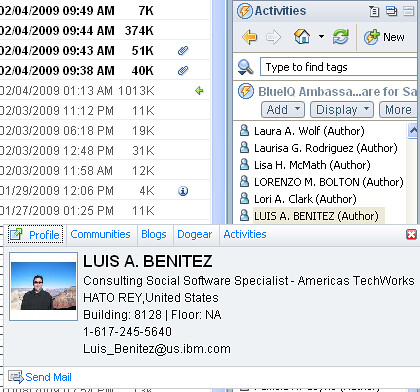
Mac users: If you are using my hack, this should have already been done for you.
Enjoy!
Why the business card from ST in Notes 8.5 is not based on profile if possible ?
ReplyDeletePierre, I'm not sure why the ST business card is not based on Profiles in Notes 8.5. I have heard, however, that in an upcoming release, the ST business card will be the Lotus Connections business card!
ReplyDeleteWeird, I had to enable the biz card on my Mac. Checked for updates to the version, but it said it was up to date.
ReplyDeleteHi Ted.. I think it depends on when you got my plugin.. I believe I updated it a week after Notes 8.5 came out, but did not change the version #! Thanks for catching that :)
ReplyDeleteHow do you get to the people view?
ReplyDeleteWhen I search for people, I only get results inside the search text-box.
Hi Roy,
ReplyDeleteWhen you are in an Activity, click the Display button and select 'Membership...'.
That should bring back the list of members for the Activity. You can then right-click on each member and get the person card!