Well, sort of. A customer this week asked me how to modify the blog template so that anonymous users could click on the 'Add a Link' comment. By default, the link is completely disabled until the user clicks on 'Log In', authenticates, and returns back to the blog entry.
I took it upon myself to look at the blog theme and figure out how to make this change. Since the themes for blogs are created using Velocity (an open source template engine), I took a quick peek of the Apache site to learn some things about how Velocity works.
Below are the steps I followed to get this working:
- Go to <WAS_PROFILE_ROOT>/installedApps/<cell_name>/Blogs.ear/blogs.war/themes/<theme name>
- Save a backup of _header.vm and Weblog.vm
- Open _header.vm with your favorite text editor
- Find the following line
#if($utils.isJapanese())
<script type="text/javascript">
<!--
{
var func = window.onload;
window.onload = function() {
if(func) {
func();
}
document.body.className = document.body.className + " lotusJapanese";
}
}
//-->
</script>
#end
and replace it with:
#if($utils.isJapanese())
<script type="text/javascript">
<!--
{
var func = window.onload;
window.onload = function() {
    if(func) {
        func();
    }
    document.body.className = document.body.className + " lotusJapanese";
}
}
//-->
</script>
#else
<script type="text/javascript">
<!--
{
var func = window.onload;
window.onload = function() {
    if(func) {
        func();
    }

    var luisBlogsUser = getCookie("blogsUser");
    if (null != luisBlogsUser && luisBlogsUser != '') {
        hideAllActionForms();
        AddWeblogEntryCommentForm.toggle('show');
        Field.focus('commentContent');
    }
}
}
//-->
</script>
#end
- Save _header.vm
- Open Weblog.vm with your favorite text editor
- Find the following line
<a class="disabledLink" id="AddWeblogEntryCommentLink" title="$text.get('entryview.actionmenu.loginHint')">$text.get("entryview.actionmenu.add_a_comment")</a>
and replace it with:
<a class="lotusAction" id="AddWeblogEntryCommentLink" title="$text.get('entryview.actionmenu.loginHint')" href="$url.site/roller-ui/login-redirect.jsp?redirect=$entry.permalink">$text.get("entryview.actionmenu.add_a_comment")</a>
- Save Weblog.vm
- Restart the Blogs server and voilá
And here's how it looks.
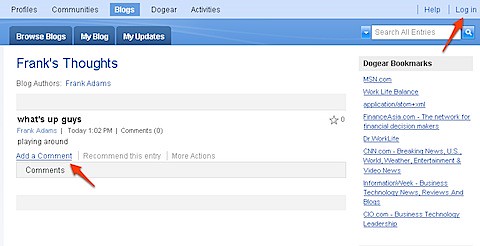
When you do this change, the 'Add a Comment' link appears for anonymous users. When they click the link, they will be sent to the login page. After successfully authenticating, they are re-directed back to the blog entry with the comment form automatically expanded.
Enjoy!
Luis, you know what makes this truly weak? You can host your blog on a public implementation of Connections at no cost. And you don't. Why not? Is it because you can't accept comments from authenticated users? Why can't you?
ReplyDeleteHi Nate,
ReplyDeleteThank you for your comment! It's always great to hear from people and it gives me a sense of who's reading my blog!
I started blogging in 2006 when Lotus Connections didn't exist as a product. It was only available inside IBM for IBMers only. Therefore, at the time I had to choose between WordPress or Google. Since I have everything else with Google, I decided to stick with Google. If Lotus Connections would have been available for free externally, I would have used it.
Also, Lotus Connections Blogs on IBM.com only recently came online (about 2 months ago I believe). Again, if it would have been available sooner I would have used it since internally I do host my blog in Lotus Connections.
re: Anonymous comments, all of my customers like this feature. In enterprise social software (as opposed to consumer social software), you need to have self-policing and accountability. Lotus Connections, however, can also be used in the extranet and the admin can decide whether or not to allow anonymous comments. But like I said, the default behavior is to not allow anonymous comments.
Do you have a use case for anonymous comments inside the enterprise? If so, I would LOVE to hear it since you would be the first one to bring it to my attention.
Please let me know so I can share your feedback with our product management team.
Hope to hear from you soon!
Luis, of course I do. The first case is when you actually want anonymous participation. The old fashioned "suggestion box" concept still has merit here.
ReplyDeleteThe second case is when your enterprise solution needs to account for people not inside the enterprise. In this case, you can have accountability without having username/password authentication. People self-identify ALL THE TIME on such systems, as I have done here.
You can look at any variety of social sites in the Lotus community and see people being accountable without strict directory controls.
Mostly, though, I'm upset that your title for this posting is a bait-and-switch. I clicked on the headline looking for a solution to an incredibly annoying limitation on Bleedyellow.com, and I got something else entirely. That's not a social practice that engenders trust, so you may consider this response a form of policing.
Nate, are you an end-user of BleedYellow.com or an admin of BleedYellow.com. Like I said, an admin can allow anonymous comments, but you need access to the system. An end-user, unfortunately, can't change this setting. If you are an admin, please reach out to me and I can walk you through the process of enabling the system for anonymous comments.
ReplyDeletere: self-identity, I've actually suggested such a customization to various customers. Some of them, specially in Latin America, do NOT like this because then you open the system to fake identities, like 'Edna' above :) . Apparently, if given the option some people would rather not say who they are.
Luis, I am an administrator of bleedyellow.com. Are you telling me you have a way that we can enable the entire site to accept comments from someone without a username/password combination in the directory? That's precisely what I thought I'd find here when I clicked on the link.
ReplyDeleteHi Nate,
ReplyDeleteAs you may know, in Lotus Connections who can post content to the system is controlled by roles. More specifically, whoever has the 'person' role can post content to the system. By default, the 'person' role is mapped to 'AllAuthenticated' which means that whoever can authenticate with the system can create content in Lotus Connections (blog entries, blog comments, bookmarks, communities, discussion forums, etc).
It's my understanding that if you map 'person' to 'Everyone' you should get the desired behavior.
Let me know!
Luis, I certainly will.
ReplyDeleteLuis, get with me on this! We've asked IBM on several occasions to please allow people to comment anonymously. We've been told that they have had this request before but that there was nothing really planned for it. I think that we see a LOT of people choosing to not have their blog at BleedYellow because of the lack of anonymous comments and we would love to have this available!!
ReplyDeleteRegarding the topic of this post, the "Add Comment" link - this was in Connections 1.0 and it would let you click the link and then login and add a comment. I really miss this feature and am glad it can be added back.
@Chris,
ReplyDeleteNow you know who to come to when you have questions about what can be done and what can't be done!
I fully agree with you and Nate. When using Lotus Connections Blogs in the extranet, anonymous comments should be accepted!
OK, so the question is HOW do we enable it?? :)
ReplyDeleteChris, I'm waiting for Nate to get back to me... see my comment above on how to enable it. It's all about mapping the role to the right 'group'.
ReplyDeleteBut "Nate" won't be the one doing the implementing... ;) Feel free to ping me on BleedYellow IM and maybe we can discuss this a bit further.
ReplyDeleteHi Luis,
ReplyDeleteWe're going to check this out, since a customer demanded. Is it by any change also possible for anonymous users to participate in a forum?
regards,
Pim
Hey Pim,
ReplyDeleteNo, it's not possible to have anonymous users post in Forums.
OK, too bad. Tnx for answering!
ReplyDeletePim