When I was a Windows user (seems so long ago now), I relied heavily on Google Desktop Search to search across my Sametime chat transcripts, Notes mail, Notes replicated databases, and other documents on my local computer. When I migrated to Mac, I quickly discovered Spotlight, but it couldn't index my Lotus Notes databases  .
.
That all changed today! I discovered in an internal forum that the latest Notes 8.5 build integrates with Spotlight. Here are the steps to follow:
- Open your Notes 8.5 inbox
- Go to Actions -> Desktop Search...
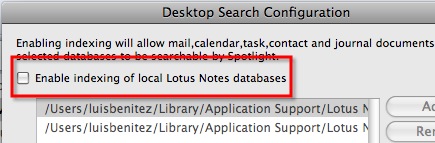
- On the dialog that opens, check the box Enable indexing of local Lotus Notes databases.
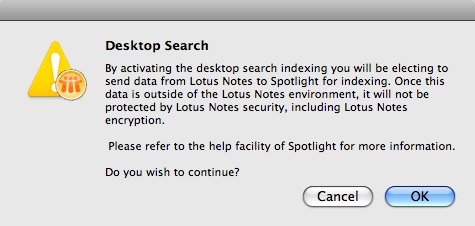
- Click OK on the warning that comes up
- Add... or Remove databases as you see fit. For example, I added my archive mail file.
- Set your indexing preferences (I only changed mine to index every 60 minutes)
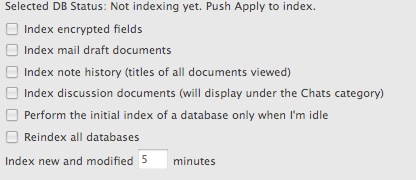
- Click Apply. Indexing starts...

- Click OK to close the pop-up
In a couple of milliseconds, you'll be able to search your Lotus Notes documents! Simply. Beautiful!
It's not just the latest build, it's been in since at least M1 (5.26.2008), though the interface to get to it is cruder in the older builds and warns that "this is enabled only in the beta."
ReplyDeleteThank you for the tip :)
ReplyDelete