For the past couple of months I have been working at an all-Lotus POC (proof of concept) which includes Portal, Quickr, Sametime, Notes 8, and Lotus Connections for a multi-national insurance firm. One of the things that they've wanted to see is Sametime presence awareness in the Lotus Connections Profiles pop-up business card (aka. person tag). In fact, many customers have asked me about it!
I had heard from development that they were working on adding that for Lotus Connections R2 and had seen some screenshots. Today, I'm happy to announce that it's working in the TAP environment!!!
(picture updated on 6/6/2008)You must know, however, that this only works if:
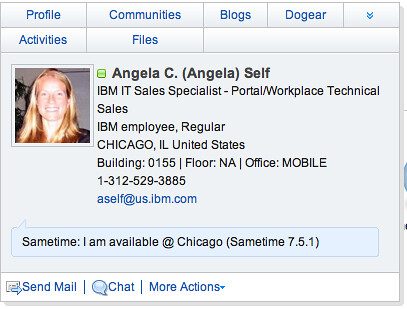
- You have the Sametime v7.5.1 (and above) client installed on your computer, and
- You are signed on to the Sametime server, and
- You install the WebLinks plugin
I'm sure by now you are using a feed reader and subscribing to my Dogears. Therefore, you already have a link with instructions on how to get this working on your computer. Enjoy and happy demoing!!!!!
Nice! Using Lotus Connections and the profile card as a launch point for communicating and NOT having to go hunt through a corporate directory to find the information!!!
ReplyDeleteLove it!
That picture on the person card looks really familiar but I just can't put my finger on where I've seen her before.
Hi jdc!
ReplyDeleteAnd the fact, that this person card can appear on any web or rich client application that your enterprise already uses is priceless!
re: the picture.. that reminds me.. I need to update some screenshots :)
I like this a lot!
ReplyDeleteHowever I don't get this working on every machine.
I've got the ST embedded client in Notes 801 and working fine.
Collegues of mine got Notes 80 and the embedded client isn't working.
Do you have any hints on versions and embedded Notes Sametime clients?
Tia Pim
Hi Tia,
ReplyDeleteFor Notes 8, you have to install the Sametime Web Kit plug-ins. Follow the instructions in this post to install the required plug-ins.
Hope this helps and thanks for stopping by and commenting. Hope to keep hearing from you..!!
I can see in the site.xml that there's a 7.5/80 version and a 801/8.5 version. That explains why the 80's didn't work (we must have only had the 801 version)
ReplyDeleteI tried your url (http://kensethdewalt.servicesolution.com/luis/site.xml) but that didn't work in Notes801 unfortunately. I think your site.xml xmlformat is not correct, because I won't see it in the browser. It gives a parsing error. If I look at another site xml (ie http://im.bleedyellow.com/updatesite/site.xml) that's displayed correctly
The site.xml is corrupt. You forgot to close the feature features/com.ibm.collaboration.realtime.webapp.feature_7.5.1.200803251718.jar
ReplyDeleteI've got the correct XML, but Blogger doesn't allow to post xml tags
Doh! Shame on me for not testing. Thanks for alerting me to the error.
ReplyDeleteI've fixed the site.xml and it should work now..
Let me know if you have any other issues!
Winch,
ReplyDeleteFYI, I just heard what the requirements are... the ST WebClient Plugins are shipped with the Sametime Client v8.0.1. I think that Notes v8.5 will include ST801 embedded, but I'm not sure.
Luis,
ReplyDeleteThanks for the update. The customer has (lucky for me) ST client 801 :)